> For the complete documentation index, see [llms.txt](https://docs.unitlab.ai/llms.txt). Markdown versions of documentation pages are available by appending `.md` to page URLs; this page is available as [Markdown](https://docs.unitlab.ai/documentation/ja/ontologies/ontology-examples-by-use-case.md).
# ユースケース別のオントロジー例
ロボット把持、人のデモンストレーション動画、CT病変の評価、病理画像、衛星・航空画像などの地理空間データ、請求書などのドキュメントについて、そのまま使えるオントロジー設計例を紹介します。クラス、主要なプロパティ、設計の理由をユースケースごとに解説します。
実際に機能している設計から始めましょう。各例には、クラス、主要なプロパティ、そのように設計した理由を記載しています。名前は自社のラベル付け作業手順に合わせて調整してください。
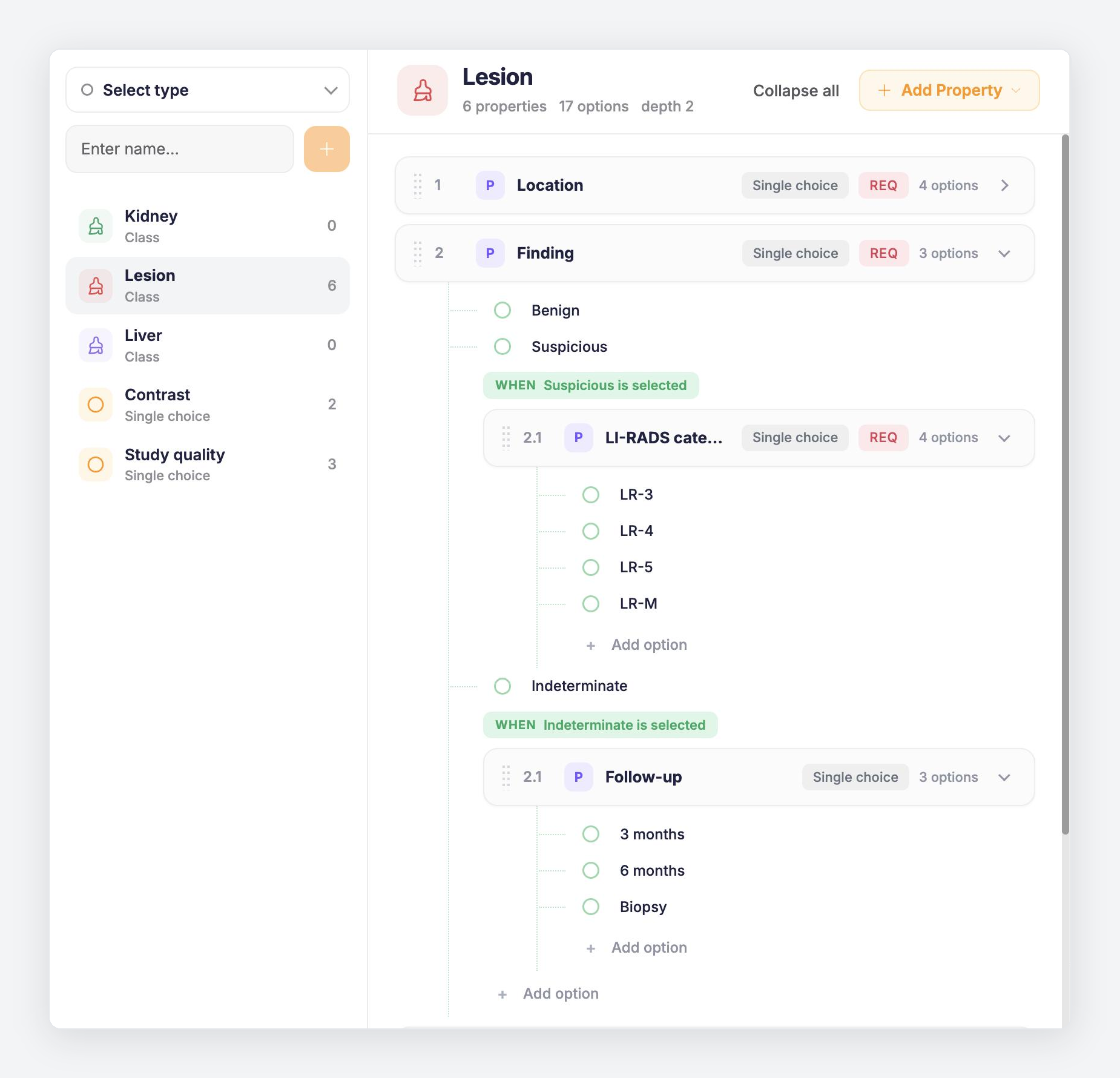
表中の › はネストされたプロパティを示します。*Finding › Suspicious: LI-RADS category* は、*Finding* が *Suspicious* のときだけ *LI-RADS category* が表示されることを意味します。
## ロボット把持
**データ:** ロボットのカメラで撮影した写真 · **目的:** ロボットがどの物体をどのようにピックアップできるかを判断する
| クラス | タイプ | プロパティ |
| ---------------- | ------- | --------------------------------------------------------------------------------------------------------------------------------------------------------- |
| Graspable object | Polygon | Object shape · Grasp status › *Pickable:* Grasp type › *Side grasp:* Approach angle (°) · Grasp status › *Blocked:* Blocked reason · Estimated weight (g) |
| Gripper | Polygon | Gripper state › *Holding:* Contact quality |
| Robot arm | Polygon | なし |
| Support surface | Polygon | Surface type: Table、Shelf、Bin |
**Item Property:** Environment(必須)、Lighting · **リレーション:** Grasp target(グリッパーから物体へ)、Rests on(物体から面へ)
ネストされた質問を持つ1つの *Graspable object* クラスで、形状や状態ごとのクラスを置き換えられます。[ネストされたプロパティ](https://docs.unitlab.ai/documentation/ja/ontologies/nested-properties.md)を参照してください。
## ロボット学習のための人のデモンストレーション
**データ:** 人が作業する様子の一人称視点動画 · **目的:** どちらの手がいつ何をしているかをロボットに教える
| クラス | タイプ | プロパティ |
| ------------------- | -------------------- | ------------------------------------------------- |
| Hand | Bounding box(トラッキング) | Side: Left、Right(静的) · Grip: Open、Pinch、Power(動的) |
| Object (part, tool) | Bounding box(トラッキング) | Location: In tray、In hand(動的) |
**Item Property:** Task phase(動的)、Camera mount(静的) · **リレーション:** Held by(物体から手へ)
変化しないものは静的、クリップの途中で変化するものは動的にします。[動画の動的プロパティ](https://docs.unitlab.ai/documentation/ja/ontologies/dynamic-properties-in-video.md)を参照してください。
## CT病変のグレード評価
**データ:** 腹部CTボリューム · **目的:** 病変と臓器をセグメンテーションし、各病変を評価する
 | クラス | タイプ | プロパティ |
| ------------ | ---- | ------------------------------------------------------------------------------------------------------------------------------------- |
| Lesion | Mask | Location · Finding › *Suspicious:* LI-RADS category · Finding › *Indeterminate:* Follow-up · Size (mm)、1〜300のNumber · Enhancement(動的) |
| Liver、Kidney | Mask | なし |
**Item Property:** Contrast: With、Without(必須) · Study quality
*Enhancement* は動的なので、動画のプロパティがフレームごとに変化するのと同じように、スライスごとに変化できます。
## 病理
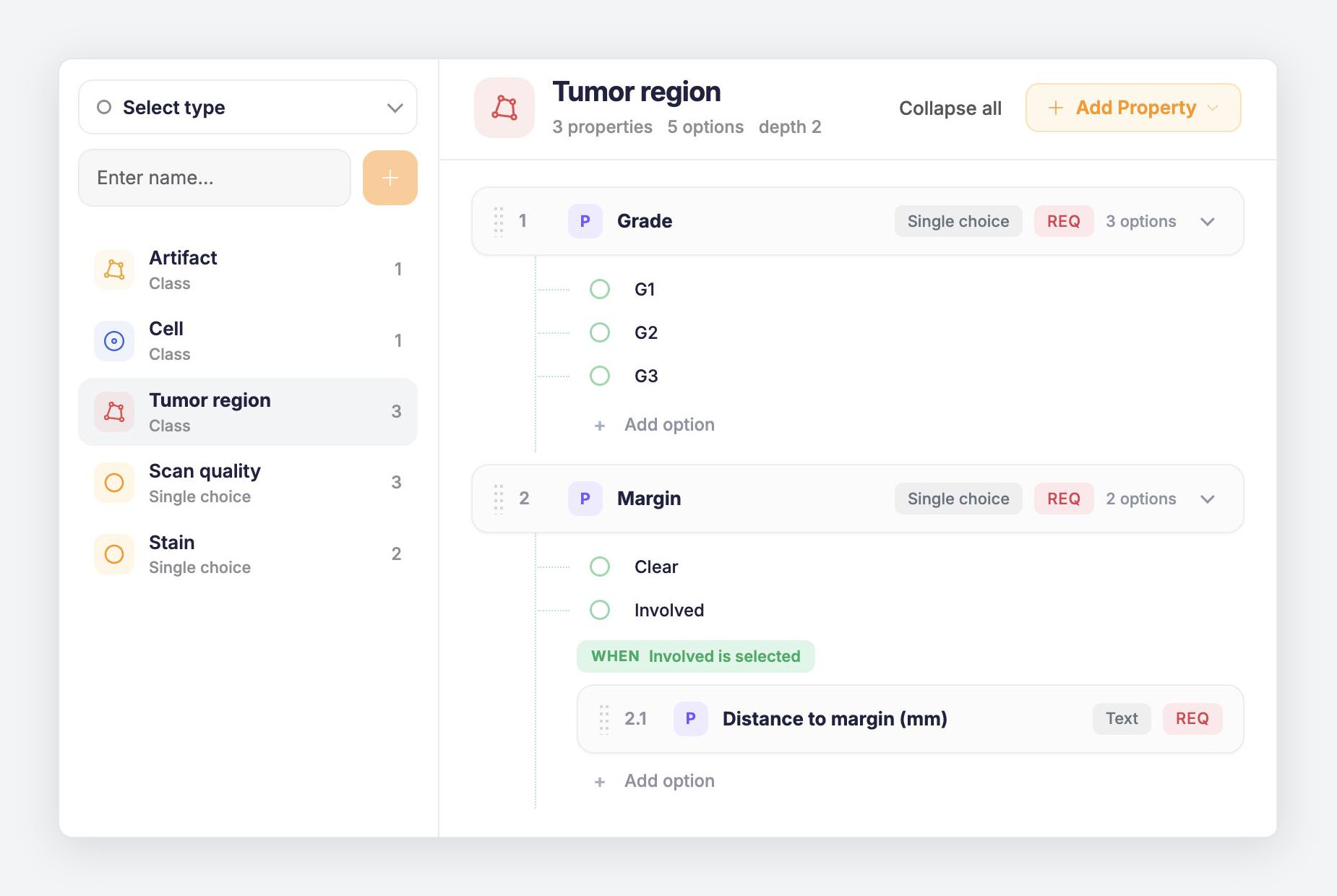
**データ:** ホールスライド画像(WSI) · **目的:** 腫瘍領域を囲み、細胞をマークし、スキャンのアーチファクトにフラグを付ける
 | クラス | タイプ | プロパティ |
| ------------ | -------- | -------------------------------------------------------------- |
| Tumor region | Polygon | Grade: G1、G2、G3 · Margin › *Involved:* Distance to margin (mm) |
| Cell | Keypoint | Cell type: Tumor、Lymphocyte、Stroma |
| Artifact | Polygon | Artifact type: Fold、Blur、Pen mark |
**Item Property:** Stain: H\&E、IHC(必須) · Scan quality
アーチファクトを独立したクラスとしてマークすると、折れ目やペンの記入を学習データから除外できます。
## 衛星画像・航空画像
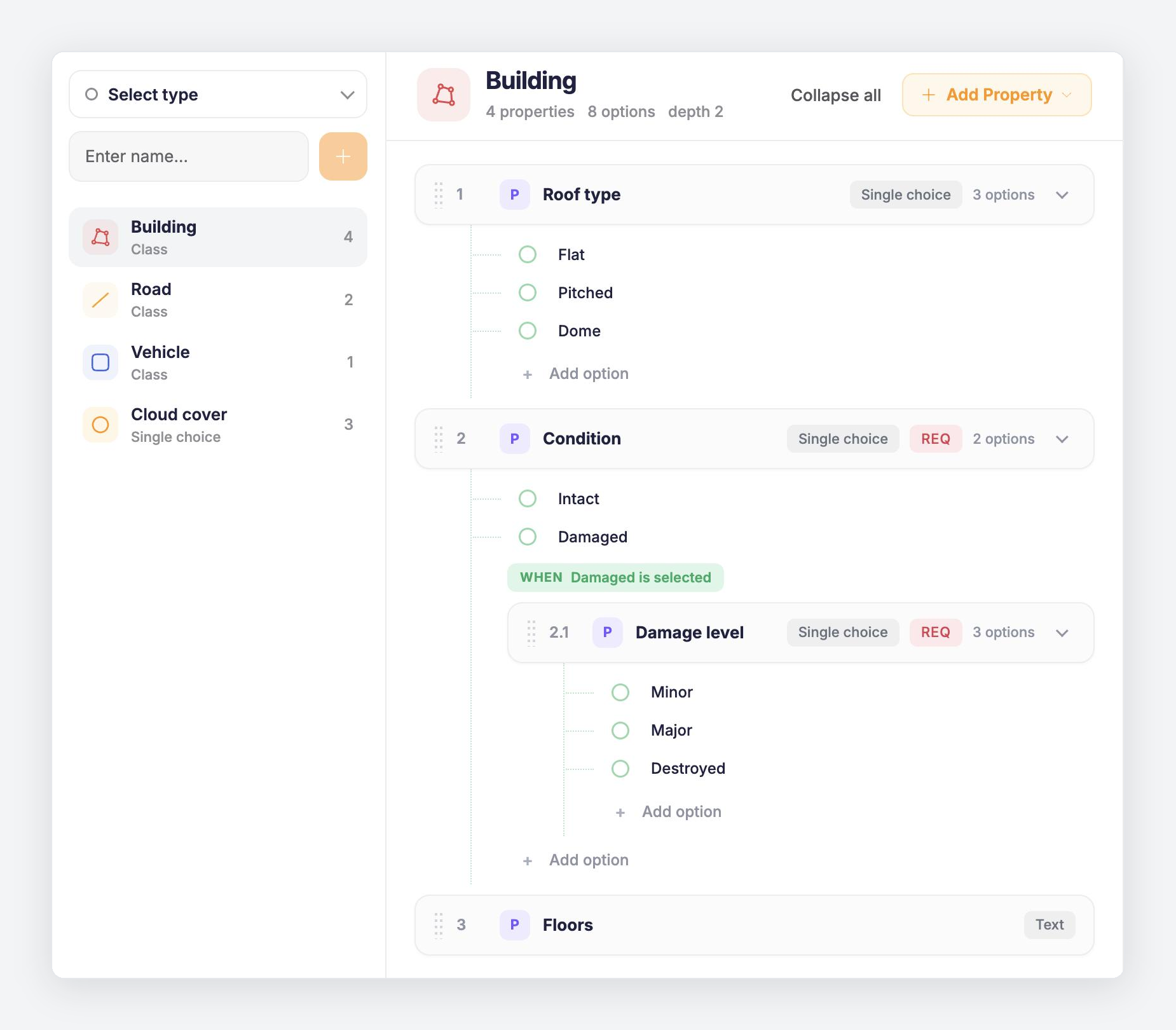
**データ:** GeoTIFFまたは大きな航空画像 · **目的:** 建物、道路、車両をマッピングし、被害を評価する
 | クラス | タイプ | プロパティ |
| -------- | ------------ | ----------------------------------------------------------------- |
| Building | Polygon | Roof type · Condition › *Damaged:* Damage level · Floors (Number) |
| Road | Line | Surface: Paved、Unpaved · Lanes (Number) |
| Vehicle | Bounding box | Vehicle type |
**Item Property:** Cloud cover: None、Partial、Heavy(必須)
## ドキュメント: 請求書とフォーム
**データ:** PDFの請求書 · **目的:** 主要な項目を抽出する
| クラス | タイプ | プロパティ |
| -------------------------------- | ------------------------------- | --------------------------------------- |
| Invoice number、Date、Total、Vendor | Entity、またはスキャンページではBounding box | Confidence: Clear、Hard to read |
| Line item | Bounding box | Quantity (Number) · Unit price (Number) |
**Item Property:** Document type: Invoice、Receipt、Credit note · **リレーション:** Belongs to(明細行から合計へ)
各項目にデータタイプとバリデーションルールを設定しておくと、合計がテキストとして入力された場合にすぐフラグが付きます。
## すべてに共通する設計ルール
* 1つの対象に1つのクラス。バリエーションにはプロパティを使う。
* 一部のオブジェクトにしかない詳細にはネストされたプロパティ。
* 時間とともに変化する状態には動的プロパティ。それ以外は静的。
* ファイル全体に関する回答にはItem Property。
* モデルに欠かせない項目には必須設定とバリデーション。
## 関連ページ
[クラスとアノテーションタイプ](https://docs.unitlab.ai/documentation/ja/ontologies/classes-and-annotation-types.md) · [プロパティ、リレーション、Item Property](https://docs.unitlab.ai/documentation/ja/ontologies/properties-relations-and-item-properties.md) · [Workbenchでオントロジーをテストする](https://docs.unitlab.ai/documentation/ja/ontologies/test-an-ontology-in-workbench.md)