> For the complete documentation index, see [llms.txt](https://docs.unitlab.ai/llms.txt). Markdown versions of documentation pages are available by appending `.md` to page URLs; this page is available as [Markdown](https://docs.unitlab.ai/documentation/ko/ontologies/ontology-examples-by-use-case.md).
# 사용 사례별 온톨로지 예시
로봇 파지, 사람 시연 영상, CT 병변 등급, 병리 슬라이드, 위성·항공 영상, 송장 문서 등 사용 사례별로 바로 복사해 쓸 수 있는 Unitlab 온톨로지 설계 예시와 클래스·속성 구성 방법, 그렇게 설계한 이유를 소개합니다.
이미 검증된 설계에서 시작하십시오. 각 예시에는 클래스, 핵심 속성, 그렇게 설계한 이유가 담겨 있습니다. 이름은 팀의 라벨링 지침에 맞게 바꾸어 쓰십시오.
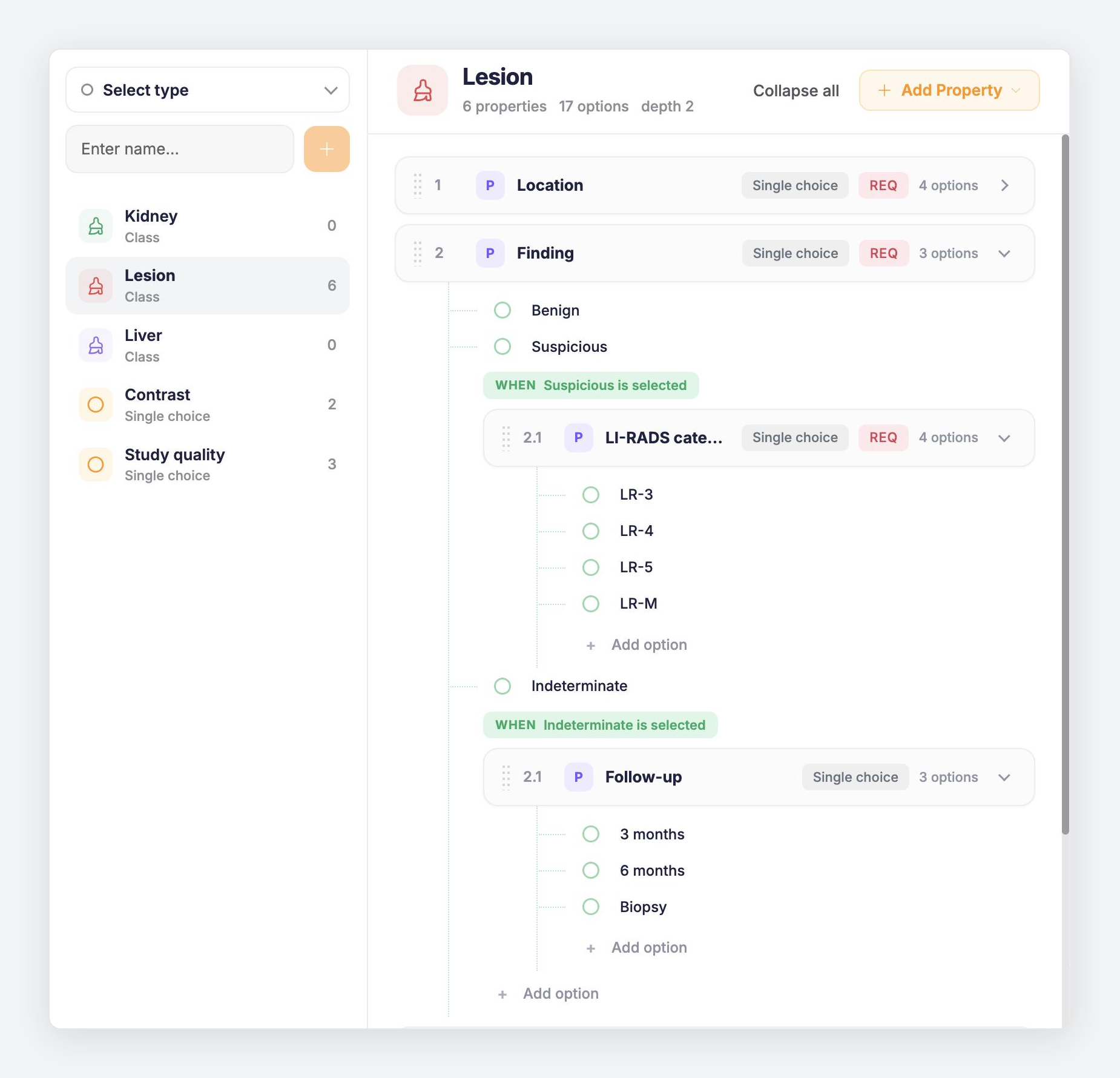
표의 ›는 중첩 속성을 뜻합니다. \_Finding › Suspicious: LI-RADS category\_는 \_Finding\_이 \_Suspicious\_일 때만 \_LI-RADS category\_가 나타난다는 의미입니다.
## 로봇 파지
**데이터:** 로봇 카메라로 찍은 사진 · **목표:** 로봇이 집을 수 있는 객체와 집는 방법 판단
| 클래스 | 유형 | 속성 |
| ---------------- | ------- | --------------------------------------------------------------------------------------------------------------------------------------------------------- |
| Graspable object | Polygon | Object shape · Grasp status › *Pickable:* Grasp type › *Side grasp:* Approach angle (°) · Grasp status › *Blocked:* Blocked reason · Estimated weight (g) |
| Gripper | Polygon | Gripper state › *Holding:* Contact quality |
| Robot arm | Polygon | 없음 |
| Support surface | Polygon | Surface type: Table, Shelf, Bin |
**Item Properties:** Environment(필수), Lighting · **관계:** Grasp target(그리퍼 → 객체), Rests on(객체 → 표면)
중첩 질문을 가진 *Graspable object* 클래스 하나가 형태와 상태마다 따로 만든 클래스를 대신합니다. [중첩 속성](https://docs.unitlab.ai/documentation/ko/ontologies/nested-properties.md)을 참고하십시오.
## 로봇 학습을 위한 사람 시연
**데이터:** 사람이 작업하는 1인칭 영상 · **목표:** 어느 손이 언제 무엇을 하는지 로봇에게 가르치기
| 클래스 | 유형 | 속성 |
| ------------------- | ---------------- | ---------------------------------------------------- |
| Hand | Bounding box, 추적 | Side: Left, Right(정적) · Grip: Open, Pinch, Power(동적) |
| Object (part, tool) | Bounding box, 추적 | Location: In tray, In hand(동적) |
**Item Properties:** Task phase(동적), Camera mount(정적) · **관계:** Held by(객체 → 손)
변하지 않는 것은 정적으로, 클립 중에 바뀌는 것은 동적으로 둡니다. [영상의 동적 속성](https://docs.unitlab.ai/documentation/ko/ontologies/dynamic-properties-in-video.md)을 참고하십시오.
## CT 병변 등급 분류
**데이터:** 복부 CT 볼륨 · **목표:** 병변과 장기를 분할하고 각 병변의 등급 매기기
| 클래스 | 유형 | 속성 |
| ------------- | ---- | --------------------------------------------------------------------------------------------------------------------------------------- |
| Lesion | Mask | Location · Finding › *Suspicious:* LI-RADS category · Finding › *Indeterminate:* Follow-up · Size (mm), Number 1\~300 · Enhancement(동적) |
| Liver, Kidney | Mask | 없음 |
**Item Properties:** Contrast: With, Without(필수) · Study quality
\_Enhancement\_는 동적 속성이므로, 영상 속성이 프레임마다 바뀌듯 슬라이스마다 값이 바뀔 수 있습니다.
## 병리
**데이터:** 전체 슬라이드 이미지(WSI) · **목표:** 종양 영역의 윤곽을 그리고, 세포를 표시하고, 스캔 아티팩트에 플래그 지정
| 클래스 | 유형 | 속성 |
| ------------ | -------- | ---------------------------------------------------------------- |
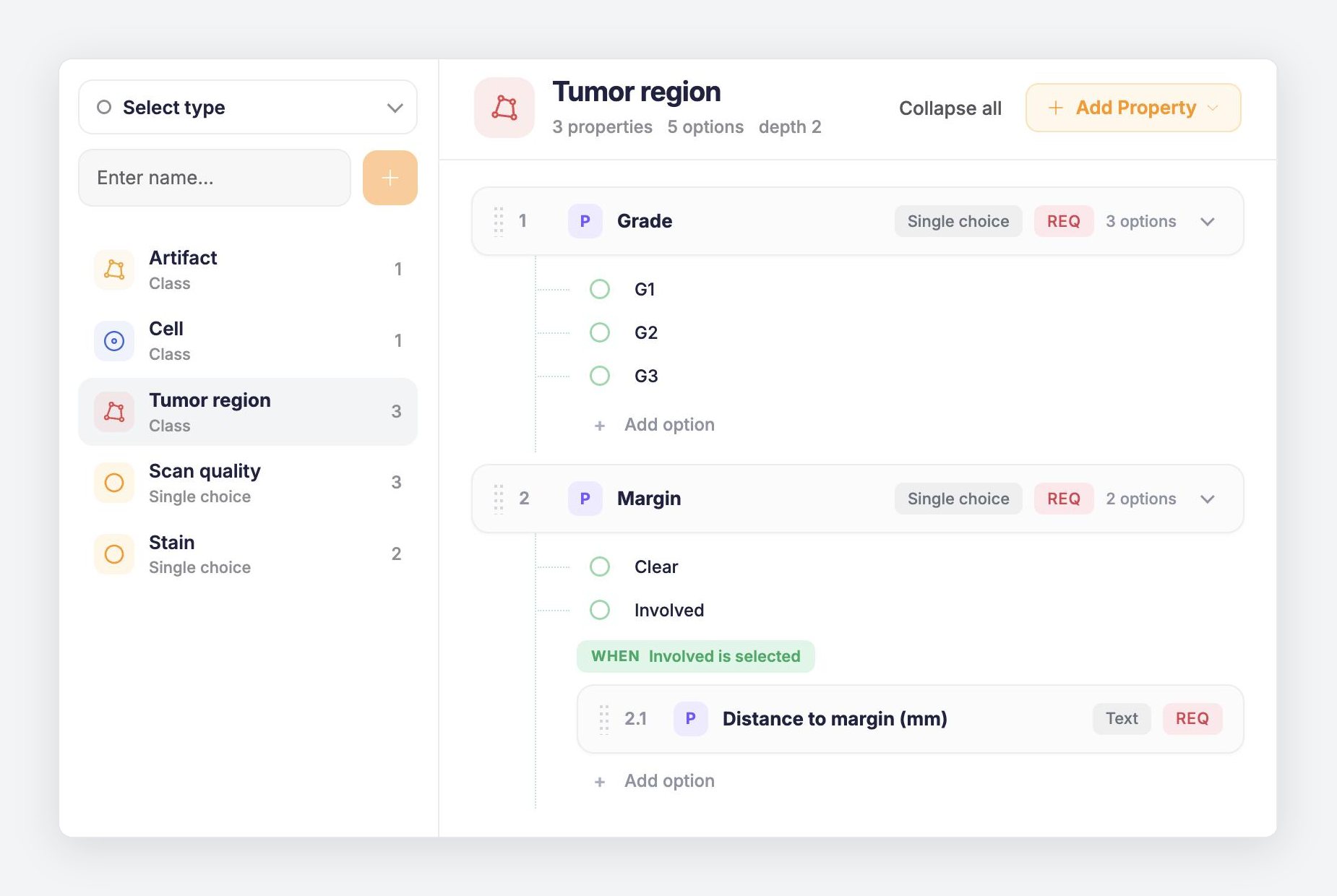
| Tumor region | Polygon | Grade: G1, G2, G3 · Margin › *Involved:* Distance to margin (mm) |
| Cell | Keypoint | Cell type: Tumor, Lymphocyte, Stroma |
| Artifact | Polygon | Artifact type: Fold, Blur, Pen mark |
**Item Properties:** Stain: H\&E, IHC(필수) · Scan quality
아티팩트를 별도 클래스로 표시하면 접힘과 펜 자국을 학습 데이터에서 제외할 수 있습니다.
## 위성 및 항공 영상
**데이터:** GeoTIFF 또는 대용량 항공 이미지 · **목표:** 건물, 도로, 차량을 매핑하고 피해 정도 평가
| 클래스 | 유형 | 속성 |
| -------- | ------------ | ----------------------------------------------------------------- |
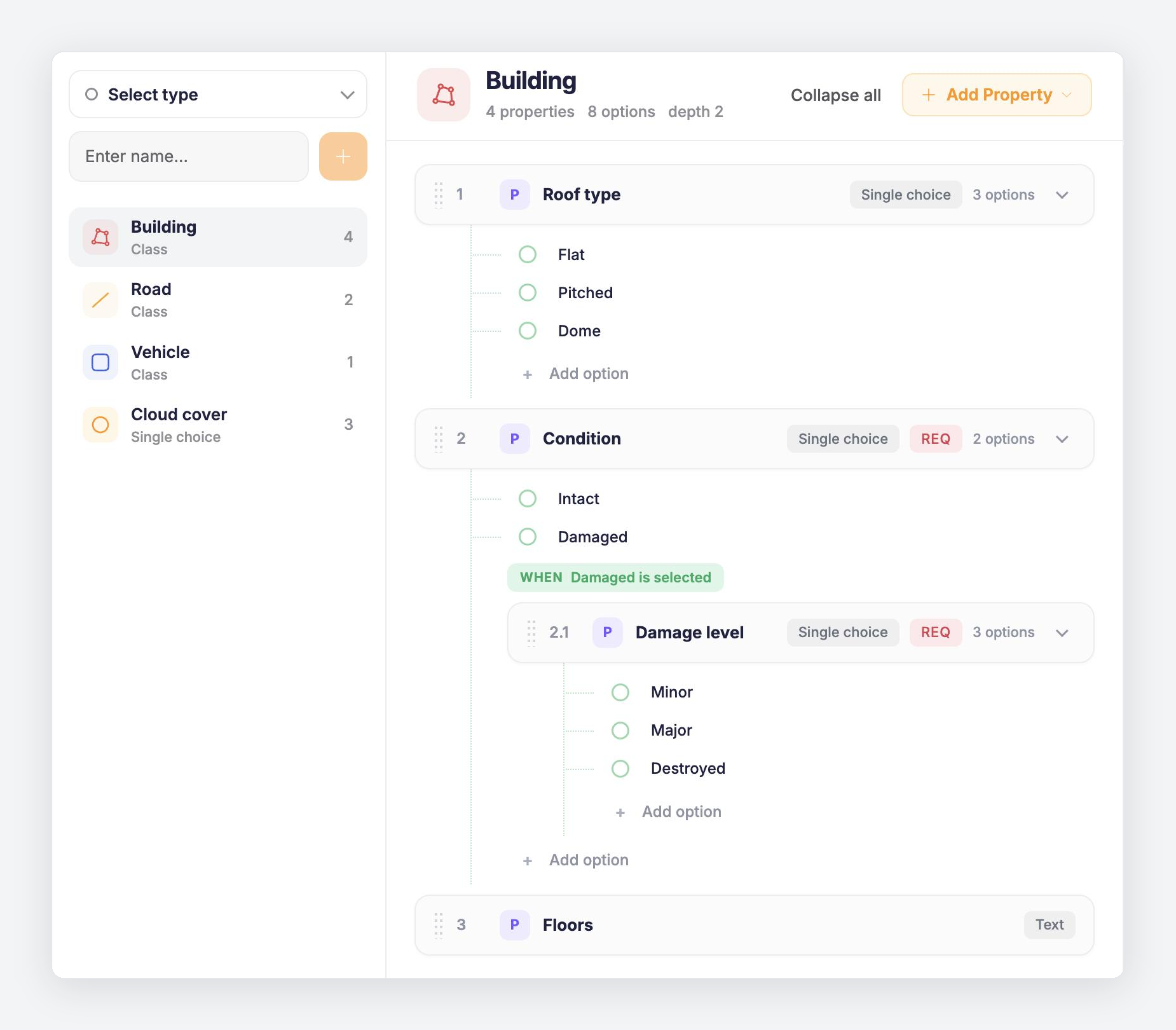
| Building | Polygon | Roof type · Condition › *Damaged:* Damage level · Floors (Number) |
| Road | Line | Surface: Paved, Unpaved · Lanes (Number) |
| Vehicle | Bounding box | Vehicle type |
**Item Properties:** Cloud cover: None, Partial, Heavy(필수)
## 문서: 송장과 양식
**데이터:** PDF 송장 · **목표:** 핵심 필드 추출
| 클래스 | 유형 | 속성 |
| ----------------------------------- | ------------------------------- | --------------------------------------- |
| Invoice number, Date, Total, Vendor | Entity, 스캔한 페이지에서는 Bounding box | Confidence: Clear, Hard to read |
| Line item | Bounding box | Quantity (Number) · Unit price (Number) |
**Item Properties:** Document type: Invoice, Receipt, Credit note · **관계:** Belongs to(품목 → 합계)
필드마다 데이터 유형과 검증 규칙을 지정하면, 합계가 텍스트로 입력되었을 때 즉시 플래그가 표시됩니다.
## 어디에나 적용되는 설계 원칙
* 대상마다 클래스는 하나로, 변형은 속성으로 표현합니다.
* 일부 객체에만 있는 세부 정보는 중첩 속성으로 둡니다.
* 시간에 따라 바뀌는 상태는 동적 속성으로, 나머지는 정적 속성으로 둡니다.
* 파일 전체에 대한 답은 Item Properties로 받습니다.
* 모델에 꼭 필요한 필드는 필수 항목과 검증을 설정합니다.
## 관련 문서
[클래스와 어노테이션 유형](https://docs.unitlab.ai/documentation/ko/ontologies/classes-and-annotation-types.md) · [속성, 관계, Item Properties](https://docs.unitlab.ai/documentation/ko/ontologies/properties-relations-and-item-properties.md) · [Workbench에서 온톨로지 테스트](https://docs.unitlab.ai/documentation/ko/ontologies/test-an-ontology-in-workbench.md)