> For the complete documentation index, see [llms.txt](https://docs.unitlab.ai/llms.txt). Markdown versions of documentation pages are available by appending `.md` to page URLs; this page is available as [Markdown](https://docs.unitlab.ai/solutions/hi/program-design-guides/human-ai-annotation-operations.md).

# ह्यूमन–AI एनोटेशन ऑपरेशंस

AI-असिस्टेड एनोटेशन: Unitlab वर्कफ़्लो के Model स्टेज में मॉडल से डेटा प्री-लेबल कराएँ, फिर एनोटेटर उसे सुधारें और रिव्यू करें। ह्यूमन-इन-द-लूप लेबलिंग।

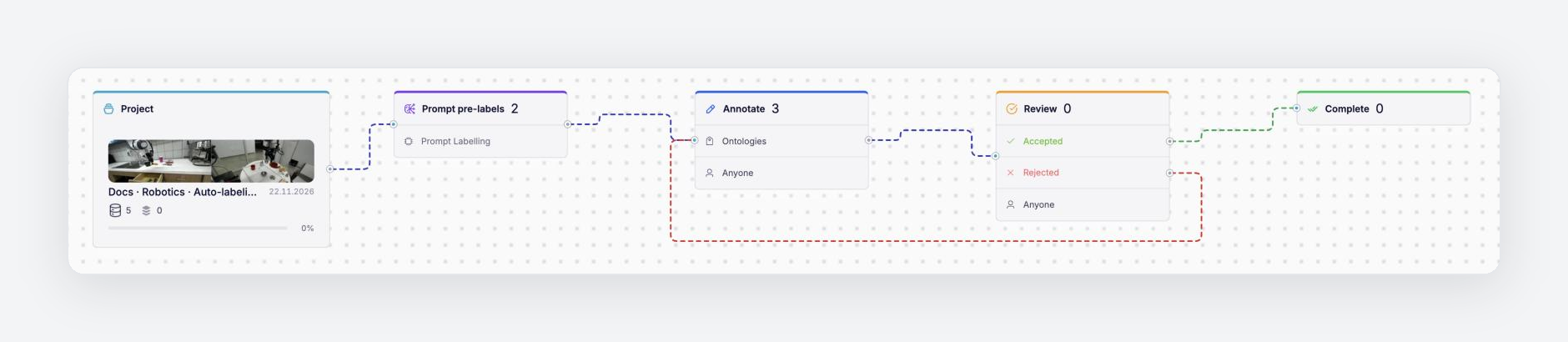
पहला पास मॉडल करते हैं, फ़ैसले लोग लेते हैं। Unitlab में वर्कफ़्लो का **Model stage** एनोटेटर के खोलने से पहले ही आइटम लेबल कर देता है, और मॉडल का हर नतीजा उसी रिव्यू से गुज़रता है जिससे मैन्युअल काम।

<figure><img src="https://content.gitbook.com/content/L7JHM0mT92u6z9mzS2ZE/blobs/ZiXCgcyh43HrcyYYRMnn/sol-al-workflow-model-stage.webp" alt="Project, Prompt pre-labels, Annotate, Review और Complete स्टेज वाला एक वर्कफ़्लो" width="800"><figcaption><p>Prompt pre-labels स्टेज Annotate से पहले चलता है, इसलिए लोग मॉडल के सुझावों से शुरुआत करते हैं।</p></figcaption></figure>

## प्री-लेबलिंग स्टेज जोड़ें <a href="#add-a-pre-labeling-stage" id="add-a-pre-labeling-stage"></a>

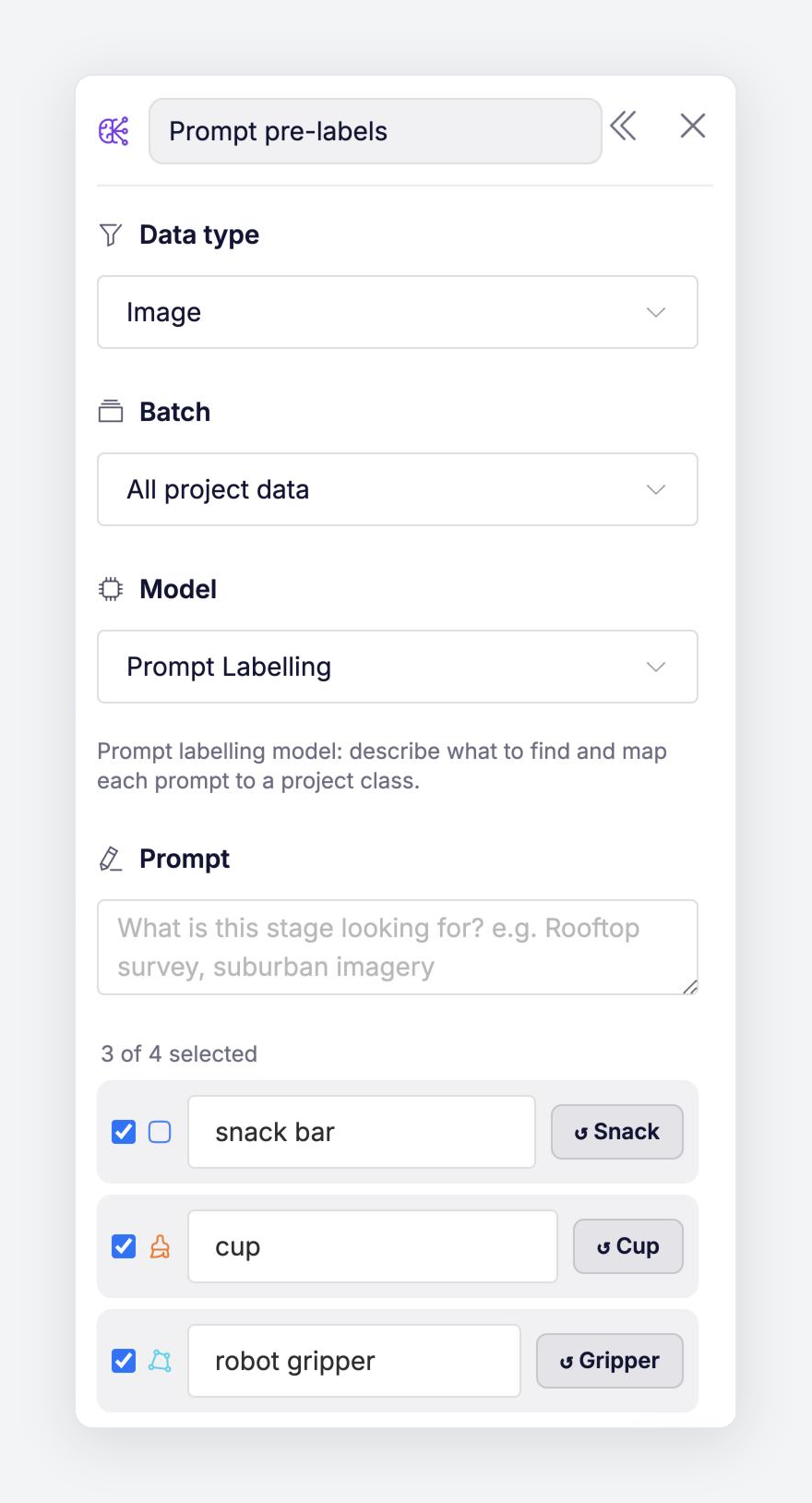
<figure><img src="https://content.gitbook.com/content/L7JHM0mT92u6z9mzS2ZE/blobs/i41qiq2unHj7YC0fstmQ/sol-al-model-stage-settings.webp" alt="Model stage सेटिंग्स, जिसमें Prompt Labelling मॉडल है और snack bar, cup व robot gripper प्रॉम्प्ट प्रोजेक्ट क्लास से मैप किए गए हैं" width="360"><figcaption><p>हर टेक्स्ट प्रॉम्प्ट एक प्रोजेक्ट क्लास से मैप होता है।</p></figcaption></figure>

1. **Workflows** खोलें और **Annotate** से पहले एक Model stage जोड़ें।
2. मॉडल चुनें। प्रॉम्प्ट मॉडल के लिए हर क्लास का एक प्रॉम्प्ट लिखें, जैसे **Cup** के लिए *cup*।
3. चुनें कि यह किन आइटम पर चलेगा, फिर सेव करें। नए आइटम सुझावों के साथ **Annotate** में आते हैं।

## एडिटर में सुधारें <a href="#correct-in-the-editor" id="correct-in-the-editor"></a>

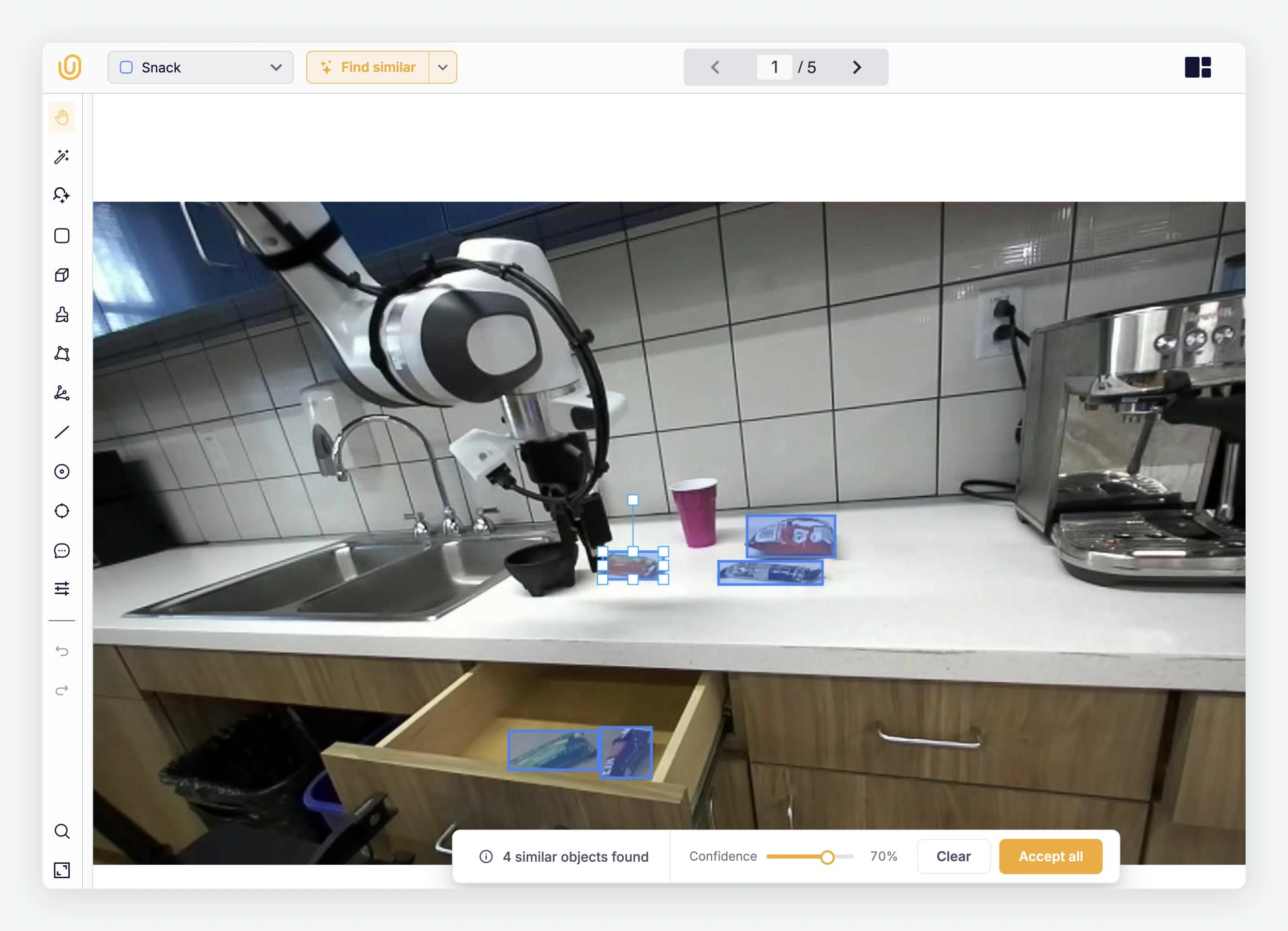
<figure><img src="https://content.gitbook.com/content/L7JHM0mT92u6z9mzS2ZE/blobs/UEPC3QAE7Cq1vnkaMRlX/sol-al-find-similar-proposals.webp" alt="किचन काउंटर पर Find similar के सुझाव, 4 मिलते-जुलते ऑब्जेक्ट मिले, 70% पर कॉन्फ़िडेंस स्लाइडर और Accept all बटन" width="800"><figcaption><p>Find similar आपके बनाए ऑब्जेक्ट जैसे और ऑब्जेक्ट सुझाता है। कम लेकिन ज़्यादा पक्के सुझाव देखने के लिए कॉन्फ़िडेंस बढ़ाएँ।</p></figcaption></figure>

* मॉडल के सुझावों को किसी भी दूसरे ऑब्जेक्ट की तरह ठीक करें या हटाएँ।
* छूटे हुए इंस्टेंस जोड़ने के लिए **Find similar** इस्तेमाल करें, फिर **Accept all** करें या एक-एक करके स्वीकार करें।
* रिव्यू के लिए भेजें। रिजेक्ट हुए आइटम कारण के साथ Annotate में लौटते हैं।

पूरे उदाहरण के लिए [रोबोटिक्स और फ़िज़िकल AI](https://docs.unitlab.ai/solutions/hi/industry-solutions-guides/robotics-and-physical-ai.md) देखें।